
 ChatGPT
This month’s release is all about helping frontline teams know what matters most and act on it faster. From feed giving every user a clearer view of the next right thing, to better ways to share knowledge in the moment, every update is focused on reducing guesswork and making action easier.
See what’s the next right thing to do
Core Platform
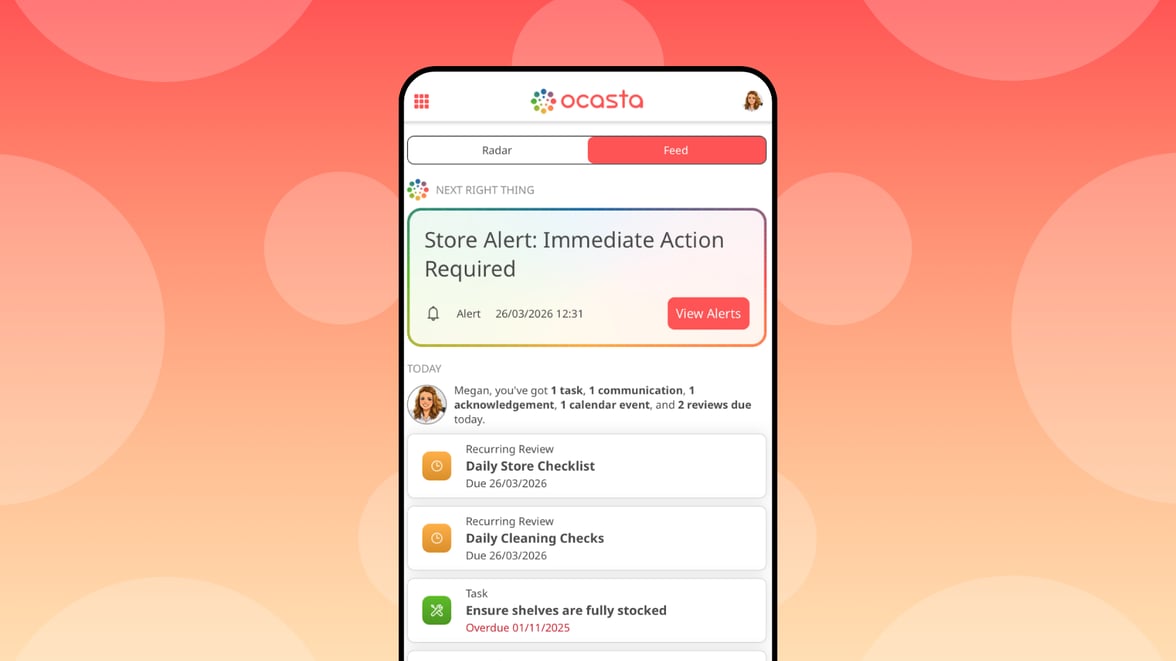
There is still too much guesswork in frontline work. When everything feels urgent, it is harder to know what needs attention first.
Feed reduces that guesswork by giving each user a clearer view of the next right thing to do. Available from the home screen, it brings together outstanding items from tasks, reviews, communications, acknowledgements, calendar, and learning in one place.
Rather than asking teams to work out what matters most, feed helps prioritise what needs attention now by surfacing the most relevant outstanding actions first. That means less switching between areas of the platform, less chance of something being missed, and a faster path from knowing to doing.
For now, users can toggle to feed from the home screen when it is enabled for their role. It is off by default for most roles, and on by default for Account Owners.
Over time, feed is likely to become the default home experience to take the guesswork out of what’s needed, next. We are gathering feedback and refining the experience so it works seamlessly for every team before making that change.
Turn meeting transcripts into updates with your Ocasta writing assistant
Comms & Engagement Hub
Knowledge & Learning Hub
Your Ocasta AI writing assistant can now create content from meeting transcripts. Turn a town hall into a clear, meaningful update, or a full article, without starting from scratch.
Did you know?
The Ocasta writing assistant can be trained on your company tone of voice, your company, and how you like to write your content. Reach out and we can set this up with you.
Manage your branding in settings 🎨
Core Platform
Account owners can manage branding themselves — no need to contact support. The new Branding section in the admin lets you customise the welcome experience, platform look and feel, and key brand elements.
Link insights to supporting articles 🔗
Inspections & Checklist Hub
Observation & Coaching Hub
Knowledge & Learning Hub
Link insights directly to articles in your knowledge base. That means your frontline gets the context they need in the moment — not just what needs doing, but how to do it.
Add links and attachments to news 📰
Comms & Engagement Hub
News posts just got more useful. Add links and attachments — the same way you do in articles — so your frontline has everything they need in one place.
Links and attachments appear in a dedicated section at the bottom of each post, making it easier to find what matters and act on it.
Link directly to a step in a how-to article 🪜
Knowledge & Learning Hub
News posts just got more useful. Add links and attachments — the same way you do in articles — so your frontline has everything they need in one place.
Links and attachments appear in a dedicated section at the bottom of each post, making it easier to find what matters and act on it.