
 ChatGPT
This release makes learning easier to manage for both learners and managers. Learners can now view their personal learning history, while Learning Managers can enrol users onto courses in bulk and require lessons to be completed in order.
We’ve also brought in-progress review management to the mobile app and refreshed the Dash management experience with a cleaner, easier-to-use interface.
Enrol learners onto courses
Knowledge & Learning Hub
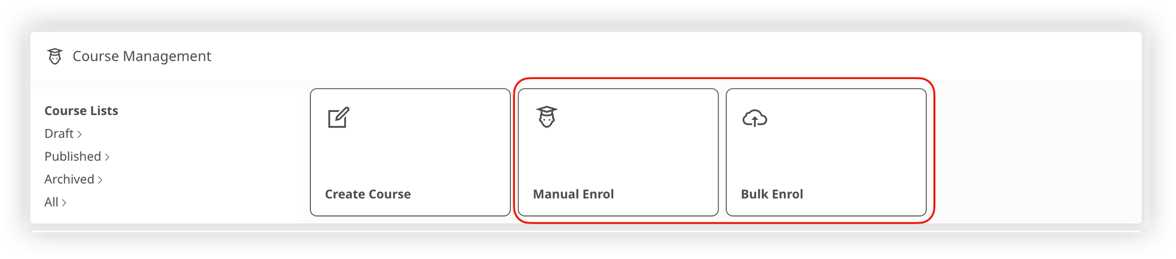
Assigning training is now quicker and more flexible.
Learning Managers can now enrol users onto courses directly, making it easy to ensure the right people complete the right training at the right time.
You can:
- Enrol individual users or small groups (up to 20 users) manually
- Bulk enrol up to 500 users at once using a file upload
When someone is enrolled, the course automatically appears in their In progress list and is recorded in their personal learning history.
Learning Managers can also view all the users they have enrolled in Learn Analytics, making it easy to track their progress and completion status.
Require lessons to be completed in order
Knowledge & Learning Hub
Guide learners through courses exactly as you intended.
Learning Managers can now require lessons to be completed in order by enabling the lessons must be completed in order option when creating or editing a course.
With this setting turned on, learners must complete each lesson before moving on to the next. It’s ideal for courses where each lesson builds on the knowledge from the previous one, creating a more structured learning experience.
View your personal learning history
Knowledge & Learning Hub
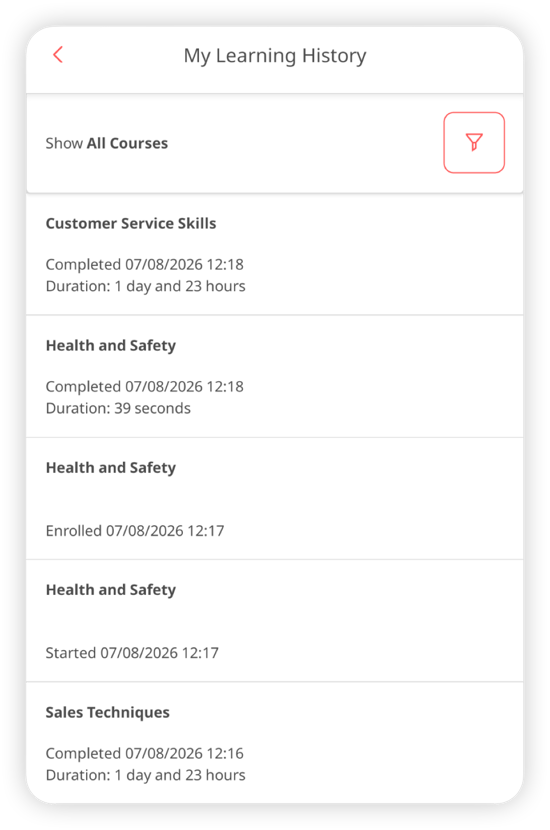
See your learning progress at a glance. Users can now access their own learning history from the You page in the My learning section. Simply select History at the top of the section.
Your learning history shows a timeline of your course activity, including:
- Courses you’ve started
- Courses you’ve completed
- Courses you’ve abandoned
- The date each activity took place and how long it took to complete
Whether you’re checking your progress or looking back at previous training, your learning history gives you a clear picture of your learning journey.
Manage in-progress reviews from the app
Inspections & Checklist Hub
Observations & Coaching Hub
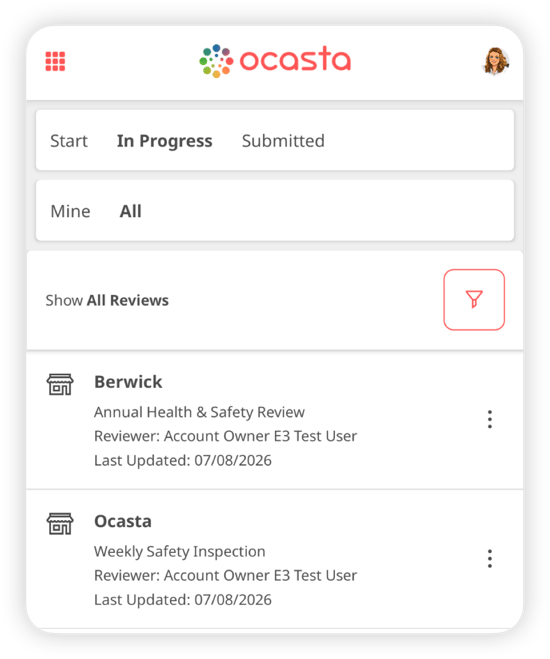
Managing reviews on the go just got easier.
If you have permission to view reviews, you can now see every in-progress review you’re allowed to access directly from the Ocasta app. Which reviews you see depends on your roam permissions.
If you also have permission to reassign reviews, you can reassign any in-progress review you have access to without switching to the web.
Under In progress reviews, you’ll now see two tabs:
- Mine to view your own in-progress reviews
- All to view every in-progress review your role has permission to access
Previously, this was only available on the web. Now you can check who’s completing a review or reassign work wherever you are, without switching devices.
Improved Dash management
Knowledge & Learning Hub
Managing your Dash content is now simpler.
We’ve refreshed the Dash management page in admin with a cleaner layout that’s easier to navigate.
The updated interface gives you a clearer view of your Dash items, making articles, news posts and external links quicker to find, organise and manage.
Other improvements
Some smaller improvements to keep the platform running smoothly for you:
- You can quickly move between insights on the Single Insight View.
- KPI insights now score on a RAG scale.
- Learn History has an All Time view to see all learning history.
- Roles now always appear alphabetically.
- You can tap the background of a modal or popup to dismiss it (like when looking at images).
- Updating a location now also updates that information in any historic reviews.
- Improved the review experience on the web to reduce errors on poor or slow connections.